
Introduction
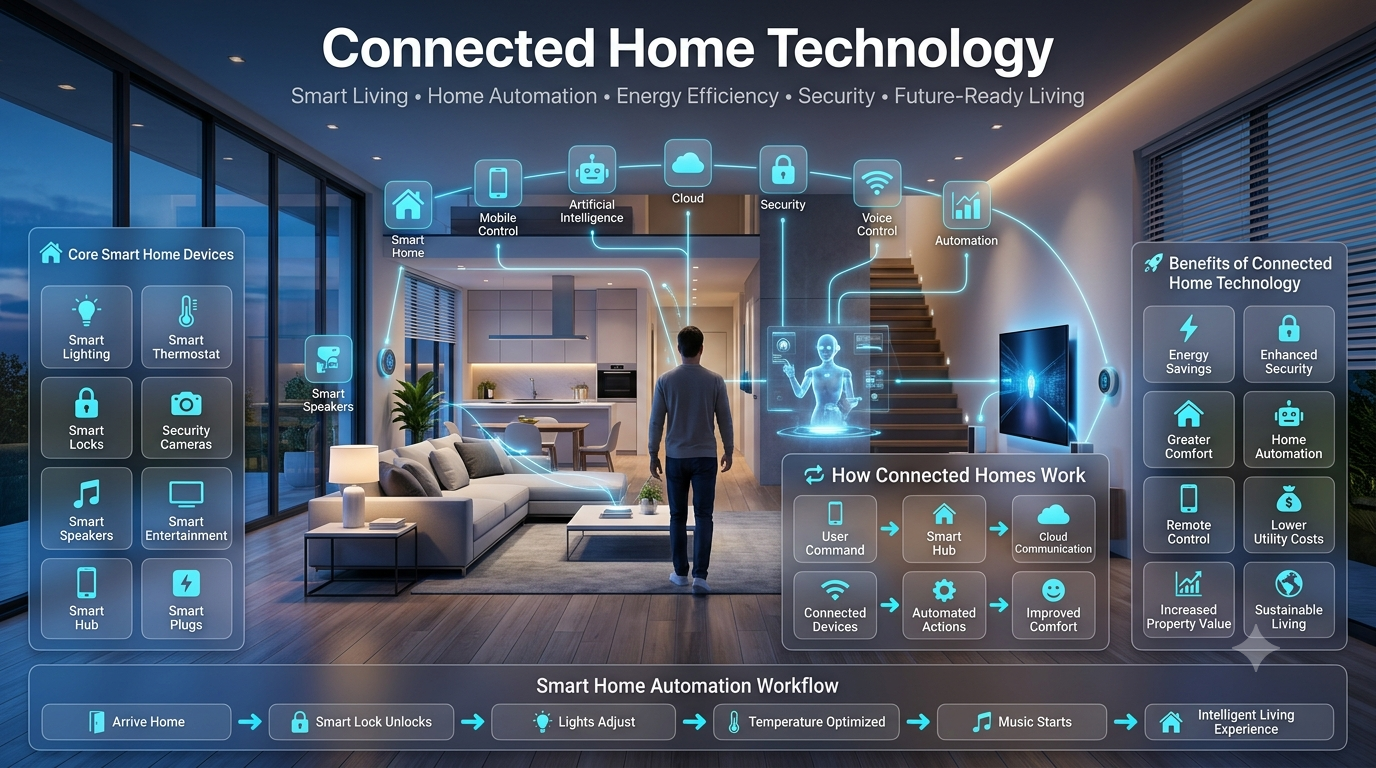
Connected Home Technology: Imagine arriving home after a long day and your lights automatically adjust to a relaxing brightness, your thermostat has already prepared the perfect temperature, your security system confirms everything is safe, and your favorite music starts playing without touching a single button.
For many homeowners, this is no longer a futuristic dream. Connected home technology has transformed ordinary houses into intelligent environments that can respond to people’s needs, improve comfort, reduce energy waste, and create safer living spaces.
However, building a connected home is not simply about buying random smart devices. Many beginners purchase smart bulbs, cameras, speakers, and appliances without understanding how these technologies work together. The result is often a confusing setup filled with incompatible devices and unnecessary expenses.
This complete guide explains everything you need to know about connected home technology, from basic concepts to advanced smart home planning. You will learn how connected homes work, which devices matter most, how different systems communicate, how to design a practical setup, and how professionals approach smart home integration.
Whether you live in a small apartment, a modern house, or are planning a complete home renovation, this guide will help you create a smarter, more comfortable, and future-ready living environment.
Key Takeaways
- Connected home technology allows household devices to communicate, automate tasks, and respond intelligently.
- A successful smart home requires planning, compatibility, and proper device selection.
- Modern connected homes combine automation, security, energy management, and entertainment.
- The best systems focus on solving real problems instead of adding unnecessary gadgets.
- Future smart homes will rely heavily on artificial intelligence, automation, and unified ecosystems.
Featured Snippet: What Is Connected Home Technology?
Connected home technology refers to a network of smart devices, appliances, sensors, and systems that communicate with each other through the internet or wireless protocols. These connected devices allow homeowners to automate tasks, monitor their homes remotely, improve security, save energy, and create personalized living experiences.
What Is Connected Home Technology?
Connected home technology is the foundation of modern smart living. It refers to devices and systems inside a home that connect digitally and exchange information to perform tasks automatically or respond to user commands.
Unlike traditional household products that operate independently, connected devices can collect data, communicate with other devices, and create automated routines.
For example:
A traditional thermostat only controls temperature manually.
A connected thermostat can:
- Learn your daily schedule
- Adjust temperature automatically
- Detect when nobody is home
- Reduce energy consumption
- Be controlled remotely from a smartphone
This difference represents the evolution from simple electronic devices to intelligent home ecosystems.
Simple Example of a Connected Home
Imagine a homeowner named Sarah.
At 7:00 AM:
- Bedroom blinds open automatically.
- Coffee machine starts preparing coffee.
- Bathroom lights turn on softly.
- Thermostat adjusts temperature.
- Security system switches from night mode to daytime mode.
When Sarah leaves:
- Doors lock automatically.
- Unnecessary lights turn off.
- Energy-saving mode activates.
- Security cameras begin monitoring.
When she returns:
- Garage opens.
- Entry lights activate.
- Home temperature adjusts.
- Favorite playlist starts playing.
This entire experience happens because connected devices communicate with each other.
How Does Connected Home Technology Work?
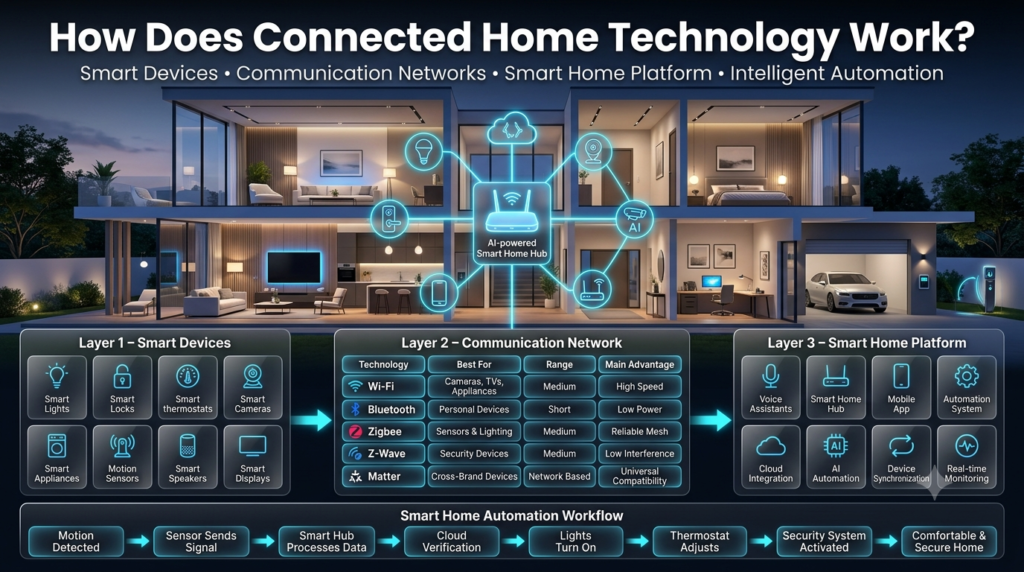
A connected home works through three main layers:
1. Smart Devices
These are physical products installed throughout the home.
Examples:
- Smart lights
- Smart locks
- Smart thermostats
- Smart cameras
- Smart appliances
- Motion sensors
- Smart speakers
These devices collect information and perform actions.
2. Communication Network
Connected devices need a method to communicate.
Common technologies include:
| Technology | Best For | Range | Main Advantage |
|---|---|---|---|
| Wi-Fi | Cameras, TVs, appliances | Medium | High speed |
| Bluetooth | Personal devices | Short | Low power |
| Zigbee | Sensors and lighting | Medium | Reliable mesh network |
| Z-Wave | Security devices | Medium | Low interference |
| Matter | Cross-brand compatibility | Depends on network | Future standard |
3. Smart Home Platform
The platform acts as the brain of the connected home.
Examples include:
- Voice assistants
- Smart home hubs
- Automation systems
- Mobile applications
The platform allows devices to work together.
Example:
A motion sensor detects movement → sends information to the hub → hub activates lights → homeowner receives notification.
Connected Home Technology Architecture Diagram
A simple connected home structure looks like this:
                 Smartphone App
                       |
                       |
              Smart Home Platform
                       |
        --------------------------------
        |              |               |
   Security       Entertainment     Climate
   System         System            Control
        |              |               |
  Cameras        Smart TV        Thermostat
  Locks          Speakers        Sensors
        |
        |
   Smart Sensors
Every connected device becomes part of one larger ecosystem.
Main Components of a Connected Home
A professional connected home usually includes several categories of technology.
1. Smart Lighting Systems
Smart lighting is often the first step homeowners take toward automation.
Connected lighting allows users to:
- Control lights remotely
- Create schedules
- Adjust brightness
- Change colors
- Reduce electricity usage
- Create mood-based environments
Example:
A dining room can automatically switch to warm lighting during dinner hours and brighter lighting during cleaning.
Smart Lighting Design Example
For a modern living room:
---------------------------------
|                               |
|       TV Wall                 |
|                               |
|  Lamp              Lamp       |
|                               |
|                               |
|       Sofa Area               |
|                               |
|   Smart Ceiling Lights        |
---------------------------------
Recommended setup:
| Area | Recommended Lighting |
|---|---|
| Ceiling | Smart recessed lights |
| Corners | Smart lamps |
| Entertainment wall | Accent lighting |
| Hallway | Motion sensors |
💡 Pro Tip:
Do not automate every light immediately. Start with high-use areas such as living rooms, bedrooms, kitchens, and outdoor entrances.
2. Smart Security Systems
Home security is one of the strongest reasons people adopt connected home technology.
Modern connected security systems include:
- Smart door locks
- Video doorbells
- Indoor cameras
- Outdoor cameras
- Motion sensors
- Window sensors
- Alarm systems
These systems allow homeowners to monitor their property from anywhere.
Example Security Automation
Scenario:
A delivery person approaches your door.
The system:
- Detects movement.
- Activates camera recording.
- Sends an alert.
- Allows two-way communication.
- Saves footage securely.
⚠ Mistake to Avoid:
Installing cameras without considering privacy zones.
Professional installers carefully plan camera positions to avoid:
- Neighbor privacy issues
- Blind spots
- Excessive recording areas
3. Smart Climate Control
Heating and cooling systems consume a large amount of household energy.
Connected climate technology helps homeowners maintain comfort while reducing waste.
Common devices include:
- Smart thermostats
- Temperature sensors
- Smart air conditioners
- Automated ventilation systems
Traditional vs Connected Climate Control
| Traditional System | Connected System |
|---|---|
| Manual temperature changes | Automatic adjustment |
| Fixed schedule | Learns habits |
| Higher energy waste | Energy optimization |
| Limited control | Remote access |
Example:
A family leaves home at 8 AM.
A connected thermostat detects nobody is present and automatically reduces cooling.
Before they return:
The system restores the preferred temperature.
4. Smart Appliances
Modern appliances are becoming increasingly connected.
Examples:
- Smart refrigerators
- Smart ovens
- Smart washing machines
- Smart dishwashers
- Smart coffee machines
These appliances provide:
- Remote control
- Maintenance alerts
- Energy monitoring
- Personalized settings
Example Smart Kitchen Setup
--------------------------------
| Refrigerator | Oven           |
|                              |
| Counter Area                 |
|                              |
| Dishwasher                   |
|                              |
| Smart Lighting               |
--------------------------------
A connected kitchen can:
- Notify you when food expires
- Suggest recipes
- Preheat ovens remotely
- Monitor energy usage
For more ideas on improving functional spaces, explore:
Home Improvement Tips
Connected Home Technology vs Smart Home: What Is the Difference?
Many people use these terms interchangeably, but there is a subtle difference.
| Feature | Connected Home | Smart Home |
|---|---|---|
| Device communication | Yes | Yes |
| Automation | Basic to advanced | Advanced |
| Intelligence | Limited | Higher |
| Human involvement | More manual control | More automatic decisions |
| AI integration | Optional | Common |
A connected home means devices can communicate.
A smart home means those connected devices can make intelligent decisions.
Benefits of Connected Home Technology
1. Improved Convenience
The biggest advantage is reducing repetitive tasks.
Examples:
- Lights turning off automatically
- Doors locking automatically
- Temperature adjusting itself
- Appliances starting on schedule
Small improvements create significant daily comfort.
2. Better Energy Efficiency
Connected technology helps homeowners understand and reduce energy consumption.
Benefits include:
- Smart scheduling
- Usage monitoring
- Automatic power reduction
- Efficient appliance management
3. Enhanced Security
Connected security systems provide:
- Real-time alerts
- Remote monitoring
- Automated responses
- Better visibility
4. Increased Accessibility
Connected homes are especially helpful for:
- Elderly homeowners
- People with mobility challenges
- Busy families
Voice commands and automation reduce physical effort.
5. Increased Property Value
Modern buyers increasingly appreciate homes with:
- Smart security
- Energy management
- Automated lighting
- Integrated technology
A professionally designed connected home can become a valuable selling feature.
Professional Connected Home Planning Principles
Interior designers and smart home professionals do not begin by buying devices.
They begin with planning.
A professional approach considers:
Lifestyle
Ask:
- Who lives in the home?
- What daily problems need solving?
- Which tasks happen repeatedly?
Home Layout
Technology placement depends on:
- Room size
- Furniture arrangement
- Electrical points
- Internet coverage
- User movement patterns
For complete space planning guidance, explore:
[INTERNAL LINK – Space Planning Guide]
Future Expansion
A good connected home should allow upgrades.
Professional planning includes:
- Strong Wi-Fi coverage
- Extra power outlets
- Proper wiring
- Flexible device compatibility
Connected Home Planning Checklist
Before purchasing devices, check:
✅ Internet speed
✅ Wi-Fi coverage
✅ Existing electrical layout
✅ Security requirements
✅ Budget
✅ Device compatibility
✅ Future expansion plans
✅ Privacy settings
Room-by-Room Connected Home Technology Design Guide
Every room has different purposes, challenges, and automation opportunities. A living room needs entertainment and atmosphere control, while a kitchen requires safety and efficiency.
Below is a professional approach to designing connected spaces.
1. Connected Living Room Design
The living room is usually the central area of a home. It is where families relax, entertain guests, watch entertainment, and spend quality time together.
Connected home technology can transform this space into a flexible environment that adapts to different activities.
Ideal Connected Living Room Features
A modern connected living room may include:
- Smart lighting
- Automated curtains
- Smart TV integration
- Voice-controlled entertainment
- Climate automation
- Motion sensors
- Smart speakers
- Ambient lighting systems
Example Living Room Layout
------------------------------------------------
|                                              |
|        Smart TV + Entertainment Wall         |
|                                              |
|                                              |
|   Lamp                              Lamp     |
|                                              |
|              Coffee Table                    |
|                                              |
|        Sofa Seating Area                    |
|                                              |
|  Motion Sensor       Smart Speaker           |
------------------------------------------------
Recommended Device Placement
| Area | Technology | Purpose |
|---|---|---|
| TV wall | Smart lighting | Reduce eye strain |
| Entrance | Motion sensor | Automatic lighting |
| Windows | Smart blinds | Natural light control |
| Sofa area | Smart speaker | Voice commands |
| Ceiling | Smart lights | Main illumination |
Real Example
A 16 × 20 feet living room can include:
- Four ceiling smart lights
- Two accent wall lights
- One motion sensor near entrance
- Smart curtains near windows
- Voice assistant near seating area
This creates a balanced automation system without unnecessary complexity.
💡 Interior Designer Advice:
Technology should support the room design, not dominate it. Hide cables, integrate devices into furniture layouts, and maintain visual balance.
For complete room styling ideas:
[ – Living Room Design]
2. Connected Kitchen Technology
The kitchen has become one of the most technology-focused areas in modern homes.
Connected kitchen technology improves:
- Cooking efficiency
- Food management
- Safety
- Energy consumption
Smart Kitchen Features
Popular connected kitchen devices include:
- Smart refrigerators
- Smart ovens
- Smart coffee makers
- Smart faucets
- Smart lighting
- Leak detection sensors
- Smart ventilation systems
Example Connected Kitchen Layout
------------------------------------------------
| Refrigerator        Smart Oven               |
|                                              |
|                                              |
| Counter Workspace                           |
|                                              |
|        Kitchen Island                        |
|                                              |
| Dishwasher          Smart Lighting            |
------------------------------------------------
Smart Kitchen Placement Guide
| Device | Recommended Location | Reason |
|---|---|---|
| Smart speaker | Counter corner | Easy voice access |
| Sensors | Under sinks | Detect leaks |
| Smart lights | Cabinets | Improve visibility |
| Smart appliances | Main work zones | Better workflow |
Professional Kitchen Automation Example
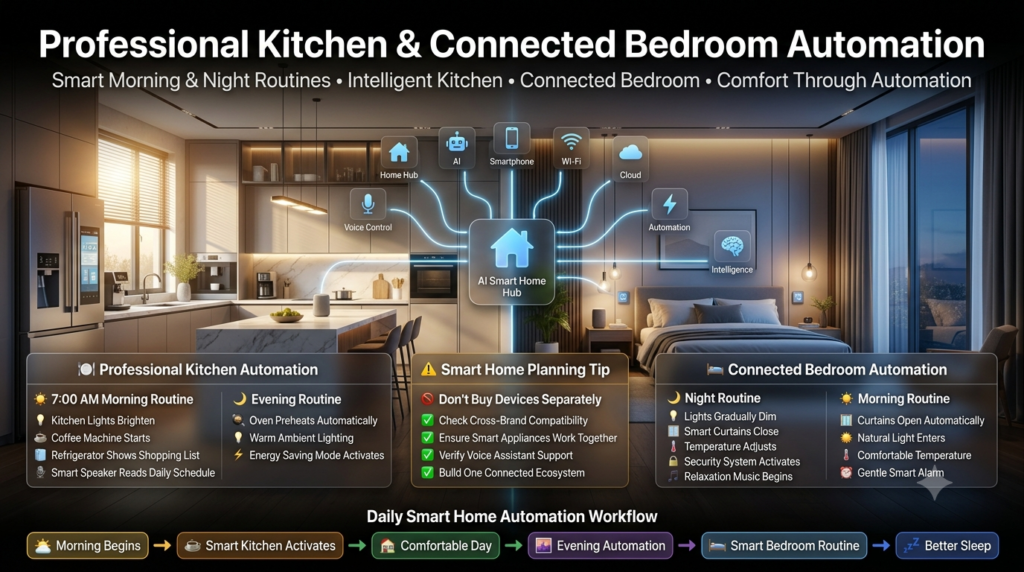
Morning routine:
7:00 AM:
- Kitchen lights slowly brighten.
- Coffee machine prepares coffee.
- Refrigerator displays shopping reminders.
- Smart speaker reads the day’s schedule.
Evening:
- Oven receives cooking settings.
- Lighting changes to warm mode.
- Energy-saving mode activates.
⚠ Mistake to Avoid:
Buying expensive smart appliances without checking compatibility.
A refrigerator, oven, and voice assistant should work together before investing.
For kitchen improvement ideas:
Kitchen Upgrading Tips
3. Connected Bedroom Technology
Bedrooms should focus on relaxation, comfort, and personalized routines.
The goal is not to fill the room with technology but to create a peaceful environment.
Smart Bedroom Features
Common solutions include:
- Smart lighting
- Automated curtains
- Smart climate control
- Sleep tracking devices
- Smart speakers
- Bedside charging systems
Example Bedroom Layout
--------------------------------------
| Window                             |
| Smart Curtains                     |
|                                    |
|      Bed                           |
|                                    |
| Lamp              Lamp             |
|                                    |
| Smart Speaker   Charging Station   |
--------------------------------------
Bedroom Automation Example
Night routine:
10:30 PM:
- Lights gradually dim.
- Curtains close.
- Temperature adjusts.
- Security system activates.
- Relaxation music starts.
Morning routine:
7:00 AM:
- Curtains open.
- Natural light enters.
- Temperature increases slightly.
- Alarm uses gentle sounds.
💡 Pro Tip:
Avoid bright screens and excessive technology near sleeping areas. Connected home design should improve sleep, not interrupt it.
4. Connected Home Office Design
Remote work has increased demand for intelligent workspace solutions.
A connected office should improve:
- Productivity
- Comfort
- Organization
- Energy efficiency
Smart Office Features
Useful technology includes:
- Smart lighting
- Automated blinds
- Smart desk systems
- Noise control
- Video conferencing equipment
- Air quality monitoring
Office Layout Example
-------------------------------------
| Window                             |
| Smart Blind                        |
|                                    |
| Desk + Monitor                     |
|                                    |
| Smart Lamp      Air Sensor         |
|                                    |
| Storage Area                       |
-------------------------------------
Professional Setup Example
A 10 × 12 feet home office:
Recommended:
- Adjustable smart desk
- One main ceiling light
- Task lighting
- Temperature sensor
- Cable management system
For workspace organization ideas:
[INTERNAL LINK – Interior Design Guide]
5. Connected Bathroom Technology
Bathrooms are becoming smarter through comfort and safety features.
Smart Bathroom Features
Examples:
- Smart mirrors
- Motion lighting
- Heated floors
- Smart showers
- Water monitoring sensors
Benefits
Connected bathrooms provide:
- Better energy control
- Improved safety
- Personalized settings
- Luxury experience
Example:
A smart shower remembers:
- Preferred temperature
- Water duration
- User settings
6. Connected Outdoor Spaces
Outdoor areas are often ignored, but they offer excellent automation opportunities.
Outdoor Connected Features
Include:
- Smart garden lighting
- Security cameras
- Automated irrigation
- Outdoor speakers
- Weather sensors
Example Garden Setup
--------------------------------
| Camera                        |
|                              |
| Garden Area                  |
|                              |
| Smart Lights                 |
|                              |
| Irrigation Sensors            |
--------------------------------
For outdoor improvement inspiration:
garden homenumental
Connected Home Technology for Small Apartments
Many people believe smart homes require large houses.
That is incorrect.
Small apartments can benefit significantly from connected technology.
Small Apartment Smart Setup
Recommended:
| Area | Device |
|---|---|
| Entrance | Smart lock |
| Living room | Smart speaker |
| Bedroom | Smart lights |
| Kitchen | Smart plugs |
| Security | Camera system |
Small Apartment Example
A 700-square-foot apartment can include:
- 6 smart lights
- 2 smart plugs
- 1 smart speaker
- 1 security camera
- Smart thermostat
This creates meaningful automation without expensive renovations.
Connected Home Technology for Large Houses
Large properties require more advanced planning.
Challenges include:
- Multiple floors
- Larger Wi-Fi requirements
- More devices
- Complex automation
Large Home Planning Example
A 3,500-square-foot house may require:
- Multiple access points
- Smart hubs
- Centralized control system
- Security zones
- Energy monitoring
Smart Home Communication Protocols Explained
Understanding communication standards helps homeowners avoid compatibility problems.
Wi-Fi Connected Devices
Best for:
- Cameras
- TVs
- Appliances
Advantages:
✔ Fast
✔ Easy setup
✔ Common technology
Disadvantages:
✘ Can overload networks
Zigbee Technology
Zigbee is popular for:
- Sensors
- Smart bulbs
- Automation devices
Benefits:
- Low energy usage
- Reliable mesh network
- Many connected devices
Z-Wave Technology
Common in:
- Security systems
- Home automation
Advantages:
- Stable communication
- Less interference
Matter Smart Home Standard
Matter is a newer standard designed to improve compatibility between brands.
It allows devices from different companies to communicate more easily.
Example:
A smart bulb from one company and a smart speaker from another can work together more smoothly.
Connected Home Technology Buying Guide
Before purchasing devices, consider these factors.
1. Compatibility
Ask:
- Does it work with my existing system?
- Will future devices connect?
- Does it support common standards?
2. Security
Check:
- Encryption features
- Password protection
- Software updates
- Privacy settings
3. Reliability
A cheap device that constantly disconnects creates frustration.
Choose:
- Established brands
- Strong customer support
- Regular updates
Smart Device Selection Checklist
Before buying:
✅ Check compatibility
✅ Read professional reviews
✅ Confirm installation requirements
✅ Check warranty
✅ Understand privacy controls
✅ Consider future expansion
Connected Home Cost Planning
Costs vary depending on automation level.
| Level | Approximate Setup | Best For |
|---|---|---|
| Beginner | Basic lights and plugs | First-time users |
| Intermediate | Security + climate + entertainment | Families |
| Advanced | Whole-home automation | Luxury homes |
Beginner Connected Home Setup Example
A practical starter package:
Living Room
- Smart speaker
- Smart lights
- Smart TV integration
Bedroom
- Smart bulbs
- Smart curtains
Entrance
- Smart lock
- Security camera
Kitchen
- Smart plugs
Professional Planning Rule: Automate Problems, Not Everything
A common misunderstanding is that a smarter home means more devices.
Professionals follow a different rule:
Every connected device should solve a real problem.
Examples:
Good automation:
✔ Lights turning off automatically
✔ Leak detection
✔ Energy monitoring
✔ Security alerts
Unnecessary automation:
✘ Complicated features nobody uses
✘ Too many duplicate devices
✘ Systems that require constant troubleshooting
Quick Connected Home Decision Guide
Do you want more comfort?
          |
          Yes
          |
Start with lighting + climate


Do you need better security?
          |
          Yes
          |
Install cameras + smart locks


Do you want energy savings?
          |
          Yes
          |
Add sensors + smart thermostat
Summary: Connected Home Design Principles
A successful connected home should:
✅ Match your lifestyle
✅ Improve daily routines
✅ Protect privacy
✅ Save energy
✅ Allow future upgrades
✅ Maintain beautiful interior design
Advanced Connected Home Automation Systems
What Is Advanced Home Automation?
Advanced home automation combines multiple connected systems into one intelligent environment.
It integrates:
- Lighting
- Security
- Climate control
- Entertainment
- Appliances
- Energy monitoring
- Artificial intelligence
- Sensors
Instead of controlling individual devices separately, homeowners create complete experiences.
Example: Complete Morning Automation Routine
A professional connected home morning routine may include:
6:30 AM
The system detects morning schedule.
↓
Smart curtains open gradually.
↓
Bedroom lights increase slowly.
↓
Thermostat adjusts temperature.
↓
Coffee machine starts.
↓
Bathroom mirror displays weather information.
↓
Security system switches from night mode.
This creates a smoother daily experience while reducing repetitive tasks.
AI Integration in Connected Homes
Artificial intelligence is becoming one of the most important developments in connected home technology.
Traditional smart devices follow instructions.
AI-powered systems learn patterns.
How AI Improves Connected Homes
AI can analyze:
- User habits
- Energy usage
- Temperature preferences
- Daily schedules
- Security patterns
Then it can automatically optimize the environment.
Examples of AI Smart Home Decisions
Example 1: Energy Optimization
AI notices:
- Nobody is home between 9 AM and 5 PM.
- Cooling remains active.
- Energy usage increases.
The system recommends:
“Reduce cooling during empty hours.”
Example 2: Lighting Adjustment
AI learns:
- Family watches movies every Friday night.
- Living room lights are always dimmed.
It automatically creates:
“Movie Night Mode.”
Connected Home Energy Management
Energy efficiency is one of the strongest benefits of modern connected homes.
Rising electricity costs have made homeowners more interested in technology that reduces unnecessary consumption.
How Connected Technology Saves Energy
Smart systems help by:
- Monitoring electricity usage
- Turning devices off automatically
- Optimizing heating and cooling
- Managing lighting schedules
- Detecting energy waste
Smart Energy Example
Traditional home:
Lights ON
|
Nobody Home
|
Energy Waste
Connected home:
Nobody Home Detected
          |
          |
Automation Activated
          |
          |
Lights OFF + Energy Mode ON
Energy-Saving Connected Devices
| Device | Energy Benefit |
|---|---|
| Smart thermostat | Reduces heating/cooling waste |
| Smart lights | Prevents unnecessary usage |
| Energy monitor | Tracks consumption |
| Smart plugs | Controls standby power |
| Smart appliances | Improves efficiency |
💡 Expert Tip:
Energy savings usually come from automation habits, not from buying expensive devices. A simple smart plug that prevents unnecessary power use can sometimes create more value than a luxury gadget.
Connected Home Security: Creating a Safer Environment
Security remains one of the biggest reasons homeowners adopt connected technology.
Modern systems provide visibility and control even when homeowners are away.
Essential Connected Security Components
A complete security setup may include:
Smart Cameras
Used for:
- Property monitoring
- Package protection
- Visitor identification
Smart Locks
Benefits:
- Keyless entry
- Temporary access codes
- Remote locking
- Activity tracking
Motion Sensors
Used to:
- Detect movement
- Trigger lights
- Activate alarms
- Send notifications
Door and Window Sensors
These provide alerts when:
- Doors open unexpectedly
- Windows are accessed
- Security zones change
Professional Security Layout Example
For a medium-sized house:
                 Outdoor Camera

                      |
                      |

Entrance ---- Smart Lock ---- Hall Sensor


Living Room ---- Indoor Camera


Back Door ---- Motion Sensor


Garage ---- Security Sensor
Security Mistakes to Avoid
Mistake 1: Poor Camera Placement
Why it happens:
Homeowners install cameras quickly without planning.
Problems:
- Blind spots
- Poor angles
- Privacy concerns
Better approach:
Study movement patterns first.
Mistake 2: Ignoring Password Security
Connected devices are still digital systems.
Always:
- Use strong passwords
- Enable two-factor authentication
- Update software regularly
Mistake 3: Buying Too Many Different Brands
Different ecosystems may create:
- Compatibility issues
- Multiple apps
- Difficult management
Connected Home Privacy and Data Protection
Connected technology creates convenience, but privacy must always be considered.
Smart devices collect information such as:
- Usage patterns
- Voice commands
- Location-based information
- Security recordings
Responsible homeowners should understand how their data is managed.
Privacy Protection Checklist
✅ Use strong passwords
✅ Update device firmware
✅ Review privacy settings
✅ Disable unused features
✅ Use secure networks
✅ Buy from trusted manufacturers
Connected Home Maintenance Guide
Like any home system, connected technology requires maintenance.
Monthly Maintenance
Check:
- Device connections
- Battery levels
- Security alerts
- Software updates
Yearly Maintenance
Review:
- Automation routines
- Security settings
- Energy reports
- Device performance
Printable Connected Home Maintenance Checklist
Technology
☐ Update software
☐ Check internet connection
☐ Test automation routines
☐ Replace sensor batteries
Security
☐ Review camera settings
☐ Change passwords if needed
☐ Check emergency alerts
Energy
☐ Review energy reports
☐ Adjust schedules
☐ Remove unused devices
Common Connected Home Mistakes Beginners Make
A connected home can become frustrating if planning is ignored.
Below are the most common mistakes.
1. Buying Devices Before Planning
Why it happens:
People purchase attractive gadgets without understanding their needs.
Consequences:
- Compatibility problems
- Wasted money
- Complex setup
Solution:
Create a technology plan first.
2. Poor Wi-Fi Planning
Connected devices depend heavily on network quality.
Problems include:
- Slow response
- Device disconnections
- Poor camera performance
Professional Solution
Before installing many devices:
Check:
- Internet speed
- Router placement
- Coverage areas
Large homes may require:
- Mesh Wi-Fi systems
- Additional access points
3. Over-Automating the Home
More automation does not always mean better automation.
A home filled with unnecessary systems can become complicated.
Better:
Simple automation that improves daily life.
Examples:
✔ Automatic lighting
✔ Smart security
✔ Temperature control
4. Ignoring Interior Design
Technology should blend with architecture.
Poor planning creates:
- Visible cables
- Unorganized devices
- Cluttered spaces
🏡 Interior Designer Advice:
Plan technology during renovation or remodeling whenever possible. Electrical points, wiring routes, and device locations become much easier to integrate.
For professional home planning resources:
[INTERNAL LINK – Room Design]
Expert Advice: How Professionals Design Connected Homes
Experienced designers and installers follow several principles.
1. Start With Lifestyle Analysis
Professionals ask:
- What problems should technology solve?
- Which routines repeat daily?
- Which areas require automation?
2. Design Around Human Behavior
Technology should follow movement patterns.
Example:
Instead of installing a motion sensor anywhere:
Place it where people naturally enter and move.
3. Choose Flexible Systems
A future-ready home should support:
- New devices
- Software updates
- Changing family needs
4. Balance Technology and Comfort
The best connected homes do not feel like machines.
They feel comfortable, natural, and personalized.
Future Trends in Connected Home Technology
The future of connected homes will include deeper intelligence and automation.
1. Artificial Intelligence Assistants
Future assistants will:
- Predict needs
- Manage schedules
- Optimize energy
- Improve security
2. Health-Focused Homes
Connected homes may monitor:
- Air quality
- Sleep patterns
- Indoor conditions
3. Sustainable Smart Homes
Future systems will focus on:
- Renewable energy
- Battery storage
- Water management
- Efficient appliances
4. Invisible Technology
Future homes will integrate technology into:
- Walls
- Furniture
- Lighting systems
- Architecture
Technology will become less visible while becoming more powerful.
Connected Home Technology Buying Checklist
Before purchasing any smart device, ask:
Compatibility
☐ Does it work with my existing system?
☐ Can it connect with future devices?
Security
☐ Does it receive updates?
☐ Are privacy settings available?
Function
☐ Does it solve a real problem?
☐ Will I use it regularly?
Installation
☐ Is professional installation required?
☐ Does my home support
Expert Reviews & Recomandations For your Experience
- Connected Home Technology allows smart devices to communicate and work together through a shared network.
- Connected Home Technology improves everyday convenience by automating routine household tasks.
- Connected Home Technology helps homeowners manage lighting, security, and appliances from one connected system.
- Connected Home Technology supports remote control through smartphones, tablets, or voice-enabled assistants.
- Connected Home Technology enhances home security with smart cameras, sensors, and connected door locks.
- Connected Home Technology encourages better energy management by monitoring electricity usage in real time.
- Connected Home Technology improves indoor comfort through automated heating and cooling controls.
- Connected Home Technology supports smart lighting that adjusts according to schedules or occupancy.
- Connected Home Technology helps reduce unnecessary energy consumption through intelligent automation.
- Connected Home Technology simplifies household management by connecting multiple smart devices into one ecosystem.
- Connected Home Technology supports personalized routines that automatically adjust home settings throughout the day.
- Connected Home Technology improves accessibility by allowing voice commands for everyday household functions.
- Connected Home Technology encourages proactive maintenance through connected monitoring and system alerts.
- Connected Home Technology supports seamless integration between entertainment, security, and home automation systems.
- Connected Home Technology helps families monitor their homes even while traveling or working remotely.
- Connected Home Technology improves daily efficiency by reducing manual operation of common household devices.
- Connected Home Technology supports scalable upgrades, allowing homeowners to expand their smart ecosystem gradually.
- Connected Home Technology encourages selecting compatible devices that communicate reliably across the same network.
- Connected Home Technology demonstrates how automation can improve comfort, convenience, security, and energy efficiency simultaneously.
- Connected Home Technology supports automated routines that perform multiple actions simultaneously with minimal user interaction.
- Connected Home Technology encourages homeowners to start with essential smart devices before expanding their connected ecosystem.
- Connected Home Technology improves long-term home management by providing real-time insights into security, energy usage, and device performance.
- Connected Home Technology supports future-ready homes by allowing new compatible devices to integrate with existing smart systems.
- Connected Home Technology ultimately demonstrates that combining automation, intelligent monitoring, secure connectivity, and compatible smart devices creates a more efficient, convenient, and comfortable living environment while simplifying everyday household management.
Frequently Asked Questions
-
What are the main benefits of connected home technology?
Connected home technology improves the way homeowners interact with their living spaces by combining automation, convenience, security, and energy management. Smart devices allow users to control lighting, temperature, security systems, appliances, and entertainment systems through mobile apps, voice assistants, or automated routines. This creates a more personalized and efficient home environment.
Beyond convenience, connected homes can improve safety through smart cameras, sensors, and automated alerts while helping reduce energy waste through intelligent monitoring. As technology continues developing, connected systems are becoming more accessible and easier to integrate into everyday lifestyles.
Main benefits include:
Remote control of home devices.
Improved security and monitoring.
Better energy efficiency.
Automated daily routines.
Increased comfort and convenience.
Personalized home experiences. -
How do smart home devices communicate?
Smart home devices communicate through wireless and wired technologies that allow different products to exchange information and respond to user commands. Common communication methods include Wi-Fi, Bluetooth, Zigbee, Z-Wave, and newer standards such as Matter, which are designed to improve compatibility between devices from different manufacturers.
A connected home usually relies on a central hub, smart speaker, or cloud-based system to manage communication between devices. When properly configured, these technologies allow lights, sensors, thermostats, cameras, and appliances to work together as one integrated ecosystem.
Common communication technologies:
Wi-Fi for internet-connected devices.
Bluetooth for short-range connections.
Zigbee for low-power smart devices.
Z-Wave for home automation systems.
Matter for improved device compatibility.
Smart hubs for centralized control. -
What should beginners buy first?
Beginners should start with smart devices that provide immediate benefits without requiring complex installation. The best first purchases are usually simple products such as smart lighting, smart plugs, smart speakers, or basic security cameras. These devices help homeowners understand automation before investing in a complete connected home system.
A successful smart home grows gradually. Instead of purchasing many unrelated devices, beginners should choose products that work together within the same ecosystem and can be expanded over time.
Recommended beginner devices:
Smart bulbs or smart switches.
Smart plugs.
Smart speakers.
Video doorbells.
Smart thermostats.
Basic security cameras. -
Is a connected home worth the investment?
A connected home can be worth the investment when smart technology solves real household problems and improves daily efficiency. The value comes from convenience, improved security, energy management, and greater control over home systems. However, the benefits depend on choosing the right devices rather than purchasing technology simply because it is available.
Homeowners should consider their lifestyle, budget, and long-term goals before investing. A carefully planned smart home can provide meaningful benefits, while an unorganized collection of devices may create unnecessary costs and maintenance challenges.
A connected home is valuable when it provides:
Practical automation.
Energy savings.
Improved security.
Better accessibility.
Increased comfort.
Long-term convenience. -
5. Can connected homes reduce electricity bills?
Yes, connected home technology can help reduce electricity costs by monitoring usage, automating devices, and preventing unnecessary energy consumption. Smart thermostats, energy monitors, automated lighting systems, and intelligent appliances can adjust operation based on occupancy, schedules, and user preferences.
However, savings depend on how devices are used. Smart technology does not automatically reduce bills; homeowners must configure automation properly and make informed decisions based on energy data.
Energy-saving smart features include:
Smart thermostats with scheduling.
Automated lighting controls.
Energy monitoring systems.
Smart power strips.
Motion-based sensors.
Efficient appliance management.
Final Thoughts: Building the Connected Home of the Future
Connected home technology represents a major shift in how people interact with their living spaces.
The goal is not to fill a house with expensive gadgets. The goal is to create an environment that supports comfort, safety, efficiency, and everyday convenience.
A successful connected home begins with understanding your lifestyle, planning your spaces carefully, selecting compatible devices, and focusing on meaningful automation.
Whether you start with smart lighting in a small apartment or design a complete automated house, the principles remain the same:
- Plan before purchasing.
- Choose technology that solves real problems.
- Protect privacy and security.
- Design technology around human needs.
- Think about future expansion.
The smartest homes are not the ones with the most devices.
They are the ones where technology quietly improves life every day.